
The Chipmunks Dance Trend: Where the You Spin Me Round Trio Came From and How to Make It With AI
Follow the Chipmunks dance from its You Spin Me Round mashup to the trio routine, then use your own photos to create a 9:16 AI dance video on ChipmunksDanceAI.
The Chipmunks dance pairs a high-pitched “You Spin Me Round (Like a Record)” mashup with a trio routine built around a center spin, two side dancers swapping places, and short turns in front of the camera. The trend is easy to recognize because the choreography follows the change in the music.
Want to make a version with your own group? Open the Chipmunks Dance AI generator. You can upload three individual photos or one group photo, choose the video settings, and follow the job in Recent generations. The routine prompt is configured by the site, so there is no prompt to write or paste.
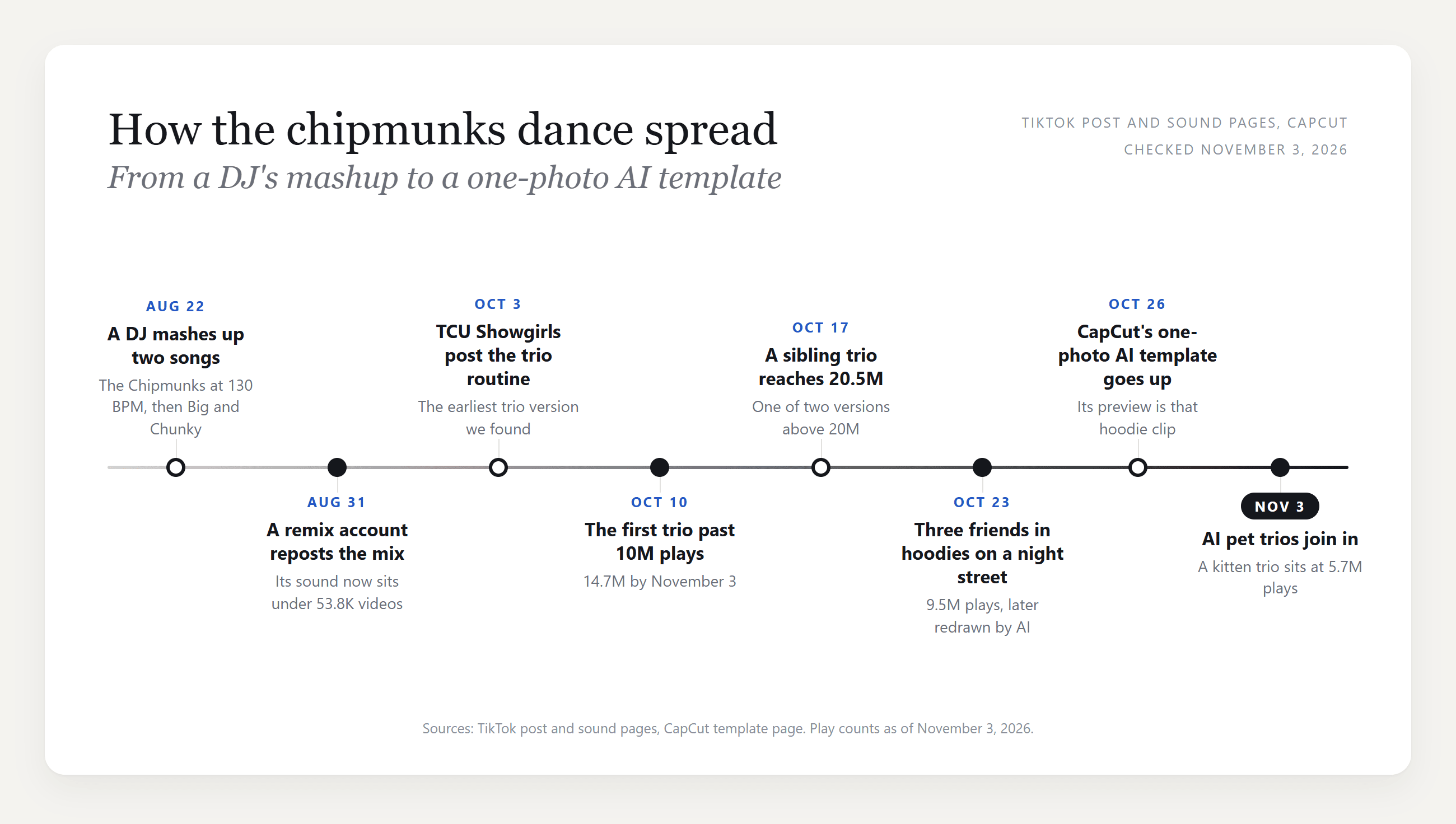
How the Chipmunks dance trend spread
The timeline graphic is a historical snapshot. Its play counts may have changed since it was created.
That sequence helps explain why the format took off: the sound gives creators a clear beat change, the trio formation makes the choreography readable in a phone frame, and template-based AI tools make it possible to recreate the handoffs with different people.
What are the Chipmunks dance moves?
Versions vary in length, but the routine usually has a few recognizable beats:
- Start in a line. One dancer stands in the middle, with one dancer on either side. Keep everyone visible in the vertical frame.
- Spin and switch. The center dancer turns while the outside dancers cross behind and trade places.
- Turn away, then face front. The trio briefly shows their backs before returning to the camera and pointing or circling one finger overhead.
- Take turns at the lens. Dancers move forward one at a time while the others keep moving in the background.
- Finish on the beat change. The later section is often more grounded: stomps, wider arm movements, and a final move toward the camera.
For a filmed version, a steady phone at about waist height makes the crossovers easier to follow. Leave enough room around the group so nobody disappears when the dancers switch sides.
How to make a Chipmunks dance video on ChipmunksDanceAI
The generator follows a fixed dance template. You choose the photos, resolution, and length; the site supplies the choreography instructions behind the scenes.
- Sign in and open the generator. Use the button above to go to the video tool on the homepage.
- Choose how to add the trio. Select Three photos to upload one clear photo for each position, or One group photo to upload a single image that clearly shows all three people. In group-photo mode, the left-to-right order in the image maps to the dance positions.
- Use suitable photos and confirm permission. For separate uploads, use clear, front-facing adult portraits with similar lighting and framing. Confirm that every adult shown has agreed to appear in the video.
- Pick the output settings. Choose 480p or 720p, then 10 seconds or 15 seconds. The video is made for a vertical 9:16 frame. Review the credit amount shown for your selected settings before starting.
- Start generation and follow its progress. After you select Generate video, the Recent generations area below the preview shows the current status. When it finishes, select the history record to view the generated clip again.
There is no custom prompt field in this workflow. You do not need to describe the dance, write timestamps, or select an AI model; the generator uses the site's configured routine.
Tips for a cleaner trio result
- Choose images where faces are visible and the people are not turned away.
- Keep the three separate photos at a similar distance and crop. A close-up mixed with a full-body shot can make the group feel uneven.
- In group-photo mode, make sure all three people are easy to distinguish and appear in the intended left-to-right order.
- Use only photos of adults who have agreed to this specific video. The generator asks you to confirm permission before submitting.
Chipmunks dance FAQ
Is the Chipmunks dance from the Alvin and the Chipmunks movies?
The song mashup references the Chipmunks cover of “You Spin Me Round,” but the trio choreography is a social-video routine. The generator makes a dance video from the photos you provide; it is not a tool for creating the movie characters.
Can I use one photo?
Yes, if it is one group photo that clearly shows all three people. The generator also supports three separate photos, one for each position.
Do I need to provide a prompt?
No. The dance prompt is configured by the site and is not exposed as a user input in the generator.
Can I change the resolution and length?
Yes. Choose 480p or 720p and a 10-second or 15-second video. The output frame is vertical 9:16.
Where can I see my generation history?
Recent generations appears below the video preview. Sign in to see your saved records; active jobs show their status, and completed records can be selected to preview the clip again.
Ready to try the routine with your group? Create your Chipmunks dance video with your photos.